
25 Sep 26
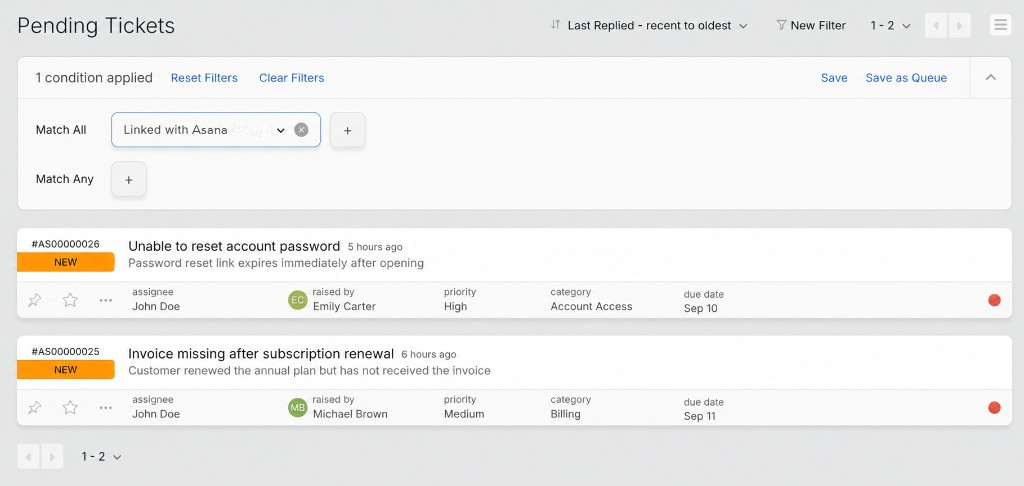
Filter Tickets Linked with Asana Tasks
You can now filter tickets by whether they are linked to an Asana task. Add the "Linked with Asana" condition in ticket filters to instantly surface all tickets with an active Asana connection. Combine it with other conditions like assignee, priority, or category to narrow down exactly what you need. Save the filter as a queue to keep those tickets always in view.
For more details, visit our knowledge base article.



 Copied!
24 Sep 26
Expanded Click-to-Copy Support Across Ticket and Contact Details Page
Copy essential information faster with expanded copy support in HappyFox HelpDesk. Previously available in select areas, this functionality now covers Ticket ID, contact name, social IDs, contact custom fields, and contact groups, and is accessible in both the Ticket Details and Contact Details pages. Simply hover over any of these fields to reveal the copy icon, then click it to instantly copy the value to your clipboard—eliminating the need to manually select text.
Copied!
8 Sep 26
Filter Tickets Linked with Azure DevOps Work Items
You can now filter tickets by whether they are linked to an ADO work item. Add the "Linked with Azure DevOps" condition in ticket filters to instantly surface all tickets with an active ADO connection. Combine it with other conditions like assignee, priority, or category to narrow down exactly what you need. Save the filter as a queue to keep those tickets always in view.
For more details, visit our knowledge base article.
Copied!
8 Sep 26
Azure DevOps Integration Actions Now Logged as Activity Updates in Tickets
When an agent creates, links, or unlinks an ADO work item, a ticket activity update is recorded automatically. It shows the agent's name and a direct link to the work item. The linked ADO work item also receives a comment with the agent's name and the HappyFox ticket ID. This applies to new actions only.
For more details, visit our knowledge base article.
Copied!
7 Sep 26
External Helpdesk as a Knowledge Source
You can now add a supported external helpdesk's knowledge base as a source for your chatbot. Browse its categories and sections, then choose exactly which articles to ingest. Saved sources display ingestion status and the number of synced articles.
External helpdesk knowledge base integration is available for select platforms. Contact HappyFox Support to learn whether your helpdesk is supported and to enable the integration.
Copied!
2 Sep 26
AI Summary Upgraded for Clearer, More Reliable Ticket Summaries
AI Summary has been upgraded to produce ticket summaries that are more concise, factual, and easier to read. Summaries are now organized into Issue, Actions Taken, Resolution, and Next Steps sections, and stay strictly grounded in the ticket, never inferring ownership, root cause, or resolution. Dates, owners, and commitments are retained when present, and a ticket is marked resolved only when the conversation or status confirms it. Greetings, apologies, and routine updates are filtered out to keep summaries focused and actionable.
Copied!